File configurator


|
|
|
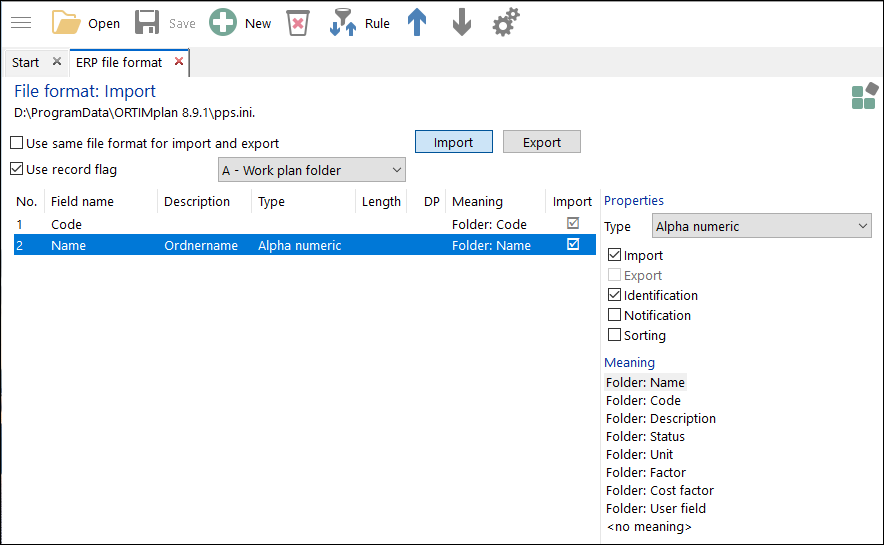
The file configurator allows you to describe the transfer file.
Toolbar
Use same file format for import and exportSelecting this option allows you to define whether you wish to use the same format for the import and export, or whether the import and export format are to be separate from each other. If you use separate formats, two buttons are enabled on the right of the check box, which allow you to use the Import and Export section. The remaining check boxes in the window are enabled or disabled accordingly. Use record identification codeThis option allows you to define whether you wish to work with or without record identification codes in your transfer files. Without record identification codes, all data that belongs together are stored in a line of the transfer file. With record identification codes, data that belong together are split into individual records. Each record is written into a separate line. The record identification code is the first character of a line. The possible record identification codes are described here. Field definitions The top left-hand section of the window displays the defined fields of the transfer file. The values for Field name, Description, Length and DP (decimal places) are entered directly into the list (double-click on the field). The contents of the remaining columns are filled by selecting the check boxes or the list of meanings. Field designationName of the field. If you select the meaning User field or Workstation, enter the name of the user field and/or the name of the workstation here. DescriptionThis field allows you to enter a short field description for the purpose of documenting the field. Length and DPThese fields allow you to enter the field length (for floating point numbers also the number of decimal places). If you do not enter any lengths, the field contents will be imported and exported as they are. TypeThis field allows you to specify a data type for the field. If you do not enter a data type, the data will be regarded as alphanumeric fields. MeaningThe meaning allows you to map the fields to ORTIMplan properties. Import, identificationIf you wish to import the field, you need to check the Import option. If you do not check this option, the field will be ignored. Using Identification allows you to define whether the field is used for identification when importing. This means, for example, that existing data are re-used when importing again.
ExportIf you wish to export the field, you need to check the option here. TypeThe type is determined after selecting an entry from the Type list (see types). Import/Export You determine whether or not the field is relevant for import and export by checking the option boxes Import and Export. IdentificationThe identification attributes are used for finding work plans and working processes in the database during import. A check is always performed during import whether a data record already exists in the database. The identification attributes are used for this. If a data record already exists, the contents are updated from the interface. If the data record does not yet exist, it will be created and connected beneath the work plan folder Automatically imported objects. If no identification is specified, the standard attributes Name and Code will be used. For work plans, it is possible to use the attributes Name (SelName) and Code (SelCode) as identifiers. For working processes, it is possible to use the attributes Name (CalcName), Code (CalcCode), Position (CalcPos) and User field (CalcUserfield) as identifiers. NotificationIf the notification property is selected, each successfully imported data record is entered into a database table (see System settings, ERP interface, Notification). You can define the database table in the system settings.
SortingIf this property is selected, all the working processes of a work plan are sorted after data import on the basis of the working process number. This means that new working processes are not appended at the back but inserted in the correct place. |