Program functions


Program functions |
|
ERP Interface
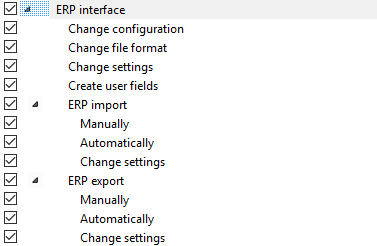
These authorizations govern the options you have when working with the ERP Interface.
ERP interfaceChange file formatThis program function allows you to define whether the file format of the transfer file is to be changed or not. This program function is disabled by default for all users. An ORTIMplan administrator should only enable this function for the administrators of the ERP interface. Generally speaking, the file format of the transfer file is not changed or is only changed on rare occasions, since this also requires that changes be made on the ERP system side. ERP importManualGoverns whether the manual import of ERP data is allowed to be executed or not. AutomaticGoverns whether the manual import of ERP data is allowed to be executed via the Task Scheduler or not. Change settingsGoverns whether the settings for the ERP import are allowed to be changed or not. The settings include the definitions for the import, archive and log directory. ERP exportManualGoverns whether the manual export of ERP data is allowed to be executed or not. AutomaticGoverns whether the manual export of ERP data is allowed to be performed via the Task Scheduler or not. Change settingsGoverns whether the settings of the task for the ERP export are allowed to be changed in the Task Scheduler or not. These settings include the definitions for the export and log directory, the time settings and the other properties of the task within the Task Scheduler. |