Example of a joint file format
The fields listed in the example above produce a transfer file with the following contents. The file format is the same here both when importing and exporting.
Import file
"Item number";"Designation";"Position";"Process";"tg";"te";"Unit"
"4711";"Item 1";10;"Clamp in";;;
"4711";"Item 1";20;"Mill";;;
"4711";"Item 1";30;"Unclamp";;;
Export file
"Item number";"Designation";"Position";"Process";"tg";"te";"Unit"
"4711";;10;"Clamp in";10,0;11,0;HM
"4711";;20;"Mill";20,0;22,0;HM
"4711";;30;"Unclamp";30,0;33,0;HM
Since the same file format is used both for the import and export procedure, the time fields remain blank when importing and the description field remains blank when exporting.
Example of a separate file format
Import file
"Item number";"Designation";"Position";"Process";
"4711";"Artikel 1";10;"Clamp in"
"4711";"Artikel 1";20;"Mill"
"4711";"Artikel 1";30;"Unclamp"
Export file
"Item number";"Position";"Process";"tg";"te";"Unit"
"4711";10;"Clamp in";10,0;11,0;HM
"4711";20;"Mill";20,0;22,0;HM
"4711";30;"Unclamp";30,0;33,0;HM
Example of a separate file format with record identification codes
A;"Category 1"
S;"a001";"Item 1"
D;"Line 1: Description of article 1"
D;"Line 2: Description of article 1"
U;"User field 1";"Value 1";"Description for user field 1"
U;"User field 2";"Value 2";"Description for user field 2"
U;"User field 3";"Value 1";"Description for user field 3"
T;"s001";"Bill of materials 1";"Line 1";11;21
T;"s001";"Bill of materials 1";"Line 2";12;22
T;"s001";"Bill of materials 1";"Line 3";13;23
D;"Description of bill of materials 1"
T;"s002";"Bill of materials 2";"Line 1";11;21
T;"s002";"Bill of materials 2";"Line 2";12;22
C;"10";"Working process";10;HM
D;"Line 1: Description of working process 10"
D;"Line 2: Description of working process 10"
T;"s003";"Bill of materials 3";"Line 1";11;21
C;"20";"Working process";20;HM
T;"s004";"Bill of materials 4";"Line 1";11;21
T;"s004";"Bill of materials 4";"Line 2";12;22
T;"s004";"Bill of materials 4";"Line 3";13;23
T;"s004";"Bill of materials 4";"Line 4";14;24
S;"a002";"Item 2"
D;"Line 1: Description of item 2"
C;"10";"Working process";10;HM
R;"a001-0";"Item 1"
After being imported, these data are displayed in the Work Plan Navigator as follows:
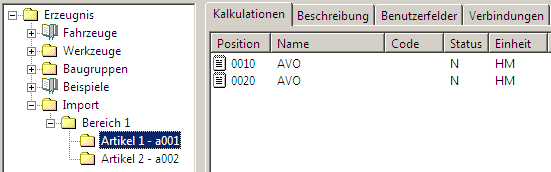
The category Category 1 has been defined.
The route sheet Item 1 and Item 2 have been connected to the category folder. The processes Working process 10 and Working process 20 have been connected to selector Item 1.
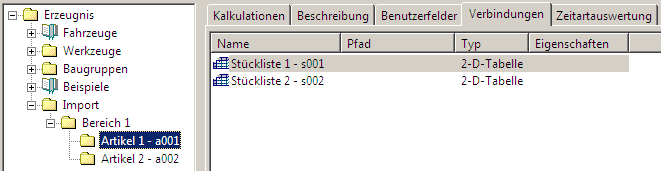
The tables Bill of materials 1 and Bill of materials 2 have been connected to work plan Item 1.
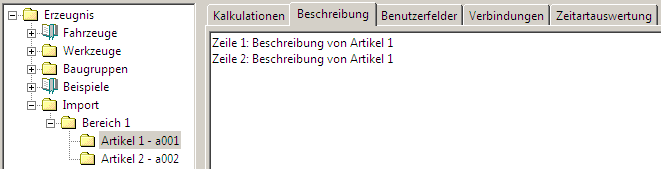
The descriptions have been entered in the work planet Item 1.
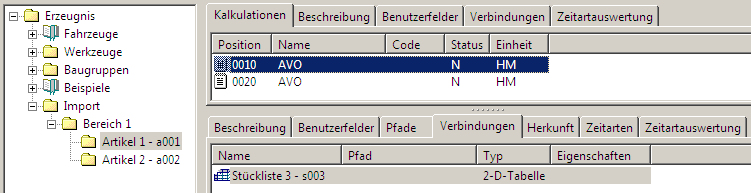
The table "Bill of materials 3" has been connected to working process Working process 10.
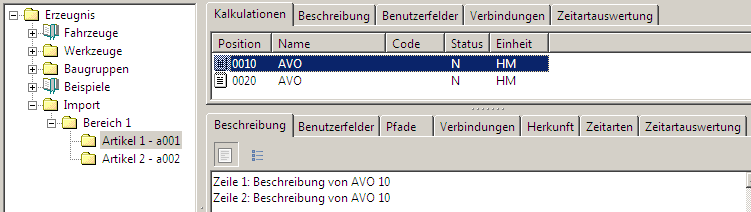
The descriptions have been entered in the working process Working process 10.
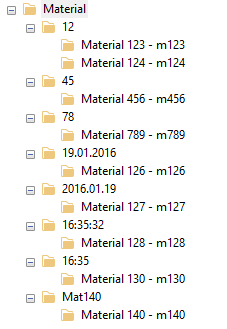
Material import
M;"#code=L2-3";"Material 123";"m123"
M;"#code=L2-3";"Material 124";"m124"
M;"#code=L2-3";"Material 456";"m456"
M;"#code=L2-3";"Material 789";"m789"
M;"#date";"Material 125";"m125"
M;"#DMY";"Material 126";"m126"
M;"#YMD";"Material 127";"m127"
M;"#time";"Material 128";"m128"
M;"#HMS";"Material 129";"m129"
M;"#HM";"Material 130";"m130"
M;"#name=L3,code=R3";"Material 140";"m140"
|  Examples

